 Pages Before Pixels
Test your plan on paper with one other person
Last reviewed
The short version
- Show your sketches to one person who doesn't know your business.
- Give them a task. Watch where they point. Say nothing.
- Write down where they got stuck, then change the plan.
Why test before you build
A paper test is a real method. It uses rough, hand-drawn sketches of a design.[1] You already have those from the wireframes step.
Testing early finds problems before any code is written.[1] Paper is also cheap to change. A new sketch costs you a sheet and a pencil.[1]
There's a small bonus. People feel more at ease criticising a rough sketch, because it doesn't look polished.[1] So you'll hear honest answers.
What you need
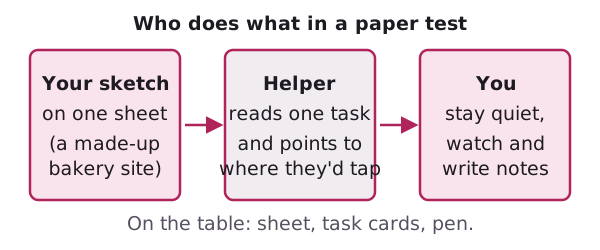
- Your sketches, one page per sheet. Include the menu from your navigation plan.
- Three task cards. Each is one line, like "Find out when the shop opens."
- One helper who doesn't know your business.
- A pen for your notes.
Pick tasks from your purpose and audience notes. They should match what real visitors want to do.
How to run it
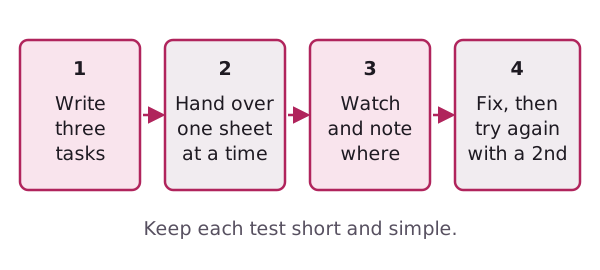
In a paper test, the helper does realistic tasks on the sketch.[1] Another person plays the computer. They show what would happen next.[1] That person is you.
- Explain it in one breath. "I'm testing the sketch, not you. There are no wrong answers."
- Hand over the home page and read task one. Let them point to where they'd tap.
- Stay quiet. Don't hint. If they ask "Is this right?", say "What would you expect?"
- Swap the sheet to show the page they would reach. Then read the next task.
- Note every pause. Write what they did, in their words if you can.
A made-up example: the task is "Find the opening hours." The helper taps About. That's a useful result. It tells you the hours need a new home.
You can also test the menu alone. Ask where someone would look for a topic on the site.[1] Count how many choose the place you planned.
Turn notes into changes
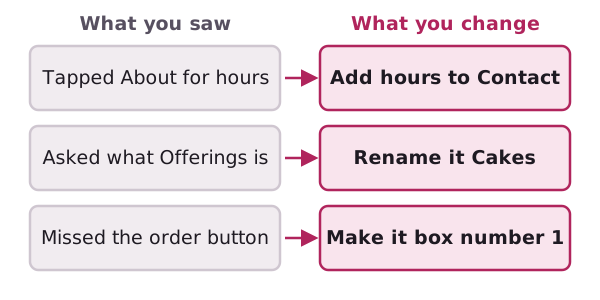
Go through your notes once, straight after the test, while you still remember it.
- One person got stuck: note it and keep going.
- You see the same stumble twice: change the plan.
- They used a word you didn't: try their word as the label.
Then redraw only the parts that changed. Changes are easy and cheap at this stage.[1] Test again with a second person. A fresh helper shows whether your fix worked.
What a paper test can't tell you
It's best at the start of a design.[1] A paper sheet can't show real speed, real colours or how a button feels.
The test is staged by you, so your own hints can skew the answers. Keep your hands and face still.
It also needs the helper in the same room.[1] A kitchen table is fine.
Next: fill the boxes with copy people can scan.
Sources
- Paper prototyping, Wikipedia (accessed 2026-11-08)